

This is a follow-up from the post yesterday, and also a beginner’s starting point to learning how to make your BWT AI performance export data speak to your Google Analytics 4 data in things like Looker Studio.
Things to know ahead of time:
- Copilot does not have a user-action-driven crawler like ChatGPT (ChatGPT-User), Claude (Claude-User), and Perplexity (Perplexity-User) do, because like Google and unlike the previous three, it taps its own search index when someone enters a prompt. This means when it uses your content, you won’t see an entry in your server access logs.
- This changed when Bing Webmaster Tools added its AI Performance report, providing data on when your URLs are cited in generative results.
- While this tutorial is going to teach you how to process your Google Analytics 4 BigQuery export data and join it to your Bing Webmaster Tools citation exports in BigQuery, remember that you can apply the same principles to your server access log data. I do this with my custom-built AI search consoles.
- The goal of this tutorial is to show you how you can match up the entrances to your site with what effectively are impressions in Microsoft Copilot (the citations) and identify clickthrough rates. It will be doing the minimum for that – your processed GA4 data is going to have 4 data points (date, landing page URL, and the number of sessions as a standby for entrances). This does not mean it is the best way to do it, and I highly encourage you to learn the basics of SQL and how Google Analytics 4 works, so you can improve the setup.
Make sure you have Google Analytics 4 exporting to BigQuery
Your Google Analytics 4 data needs to be exported into BigQuery. You aren’t going to be able to create a processed table in SQL that allows you to join the two datasets without it.
If you don’t know what I’m referring to, you can link your GA4 instance to BigQuery and send daily and streaming exports to BigQuery. You want to do this because GA4 does not store all of your data in perpetuity, unlike how Universal Analytics used to handle it. You can find this setting at the bottom of your admin section.
Lastly, my SQL query will reference the daily export data.
Create a BigQuery table with your Bing Webmaster Tools citation exports
Before you upload the data, you need to process it just a tiny bit.
The exports from BWT use this date format (3/21/2026 12:00:00 AM), whereas we need it in this date format (2026-03-21). Change the formatting.
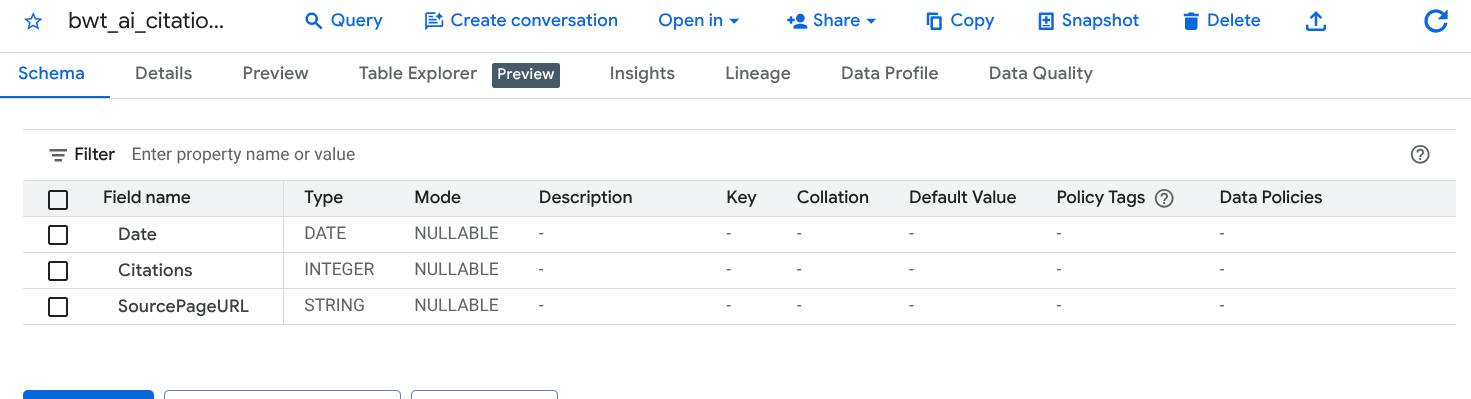
Upload it to a dataset in BigQuery as a new table. I called mine bwt_ai_citation_data.
The SQL query to process your GA4 data
A few things to know ahead of time:
- You don’t need to query and process any analytics data that occurred before the start of your Bing Webmaster Tools exports. If you followed my AI Performance export tutorial and selected the maximum date, your starting query date will be November 1, 2025. If you want this to connect to your server access logs, base it off of when that data starts.
- The SQL query only extracts traffic referrals from Microsoft Copilot.
- This presumes you’re a little familiar with BigQuery.
Copy the script below and modify it at the following points:
- Change the CREATE OR REPLACE TABLE target. This is the location where you will be creating your new table. Name the table you’re creating something appropriate, or leave it the same as below if you see fit.
- Change the FROM target to match your GA4 dataset, but leave the .events_* alone. Your daily exports are segmented by date, so this will cycle through each available one from the date you specify forward.
- Change the _TABLE_SUFFIX to align with your starting date. This tutorial is following the BWT exports, so the example will start November 1, 2025.
CREATE OR REPLACE TABLE `example_project.example_dataset.ga4_processed_raw_data_for_bwt` AS
SELECT
  -- Converts GA4 'event_date' string (YYYYMMDD) to a standard DATE
  PARSE_DATE('%Y%m%d', event_date) AS visit_date,

  -- Extracts the Landing Page URL and strips query parameters
  -- Added LOWER() to ensure URL matching consistency for the future join
  LOWER(REGEXP_REPLACE(
    (SELECT value.string_value FROM UNNEST(event_params) WHERE key = 'page_location'),
    r'\?.*$',
    ''
  )) AS landing_page_url,

  -- Counts Entrances (Sessions starting on this page)
  -- Aggregates all Copilot sources together for the same Date/URL
  COUNT(DISTINCT CONCAT(user_pseudo_id, (SELECT CAST(value.int_value AS STRING) FROM UNNEST(event_params) WHERE key = 'ga_session_id'))) AS entrances

FROM
  `example_project.example_ga4_dataset.events_*`
WHERE
  _TABLE_SUFFIX >= '20251101'
  AND event_name = 'session_start'
  AND (
    REGEXP_CONTAINS(traffic_source.source, r'copilot\.com|microsoft\.copilot\.com')
    OR REGEXP_CONTAINS((SELECT value.string_value FROM UNNEST(event_params) WHERE key = 'source'), r'copilot\.com|microsoft\.copilot\.com')
  )
GROUP BY
  1, 2
In BigQuery, run the query on your dataset. For now, I recommend saving the query, because you can use this to update your GA4 dataset every time you update your BWT export (that’s why it begins with CREATE OR REPLACE TABLE). Again, this isn’t the best way to do it, but once you start digging into BigQuery, SQL, and warehousing data, you’ll learn why – and it will also depend on the size of your data and what you process.
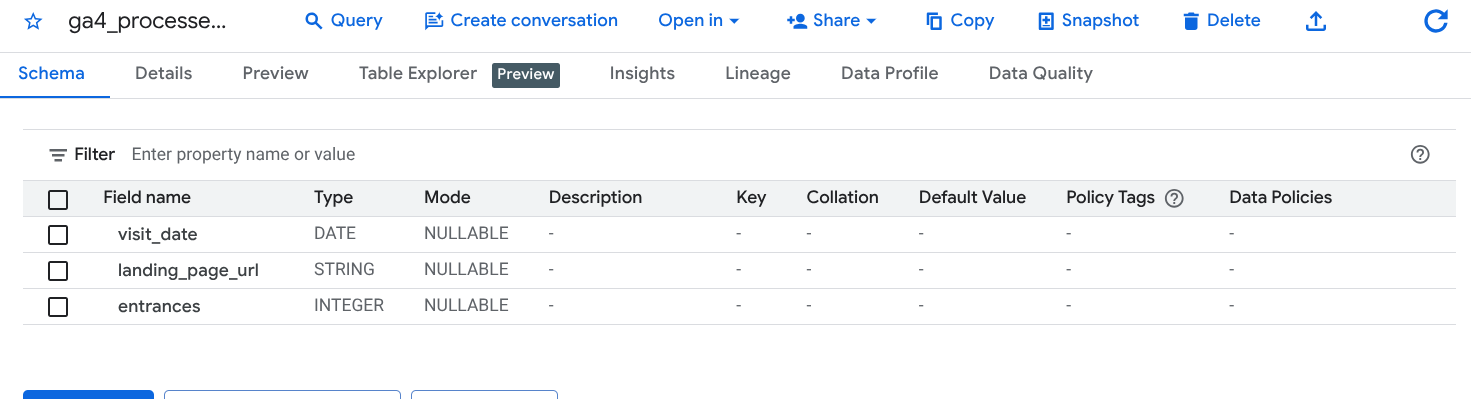
After the query runs without errors, go look at the dataset where you created the table and make sure everything is fine. It should have 3 columns: visit_date, landing_page_url, and entrances.
The SQL query to join your processed GA4 data with your BWT data
Copy the script below and modify it at the following points:
- Change the CREATE OR REPLACE TABLE target. This is the location where you will be creating your new table. Name the table you’re creating something appropriate, or leave it the same as below if you see fit.
- Change the FROM target and the FULL OUTER JOIN target to match the location of the table of your processed GA4 data and the table with your BWT upload.
CREATE OR REPLACE TABLE `example_project.example_dataset.integrated_copilot_data` AS
SELECT
  -- Use COALESCE to ensure we have a Date/URL even if one side is missing
  COALESCE(g.visit_date, c.Date) AS report_date,
  COALESCE(g.landing_page_url, c.SourcePageURL) AS page_url,

  -- Metrics: Use IFNULL to turn missing matches into 0 for cleaner reporting
  IFNULL(g.entrances, 0) AS sessions_from_copilot,
  IFNULL(c.Citations, 0) AS ai_citations

FROM
  `example_project.example_dataset.ga4_processed_raw_data_for_bwt` AS g
FULL OUTER JOIN
  `example_project.example_dataset.bwt_ai_citation_data` AS c
  ON g.visit_date = c.Date
  AND g.landing_page_url = c.SourcePageURL

ORDER BY
  report_date DESC,
  sessions_from_copilot DESC
In BigQuery, run the query on your dataset. Like the above, I recommend saving the query so you can re-run this in the future every time you update the data.
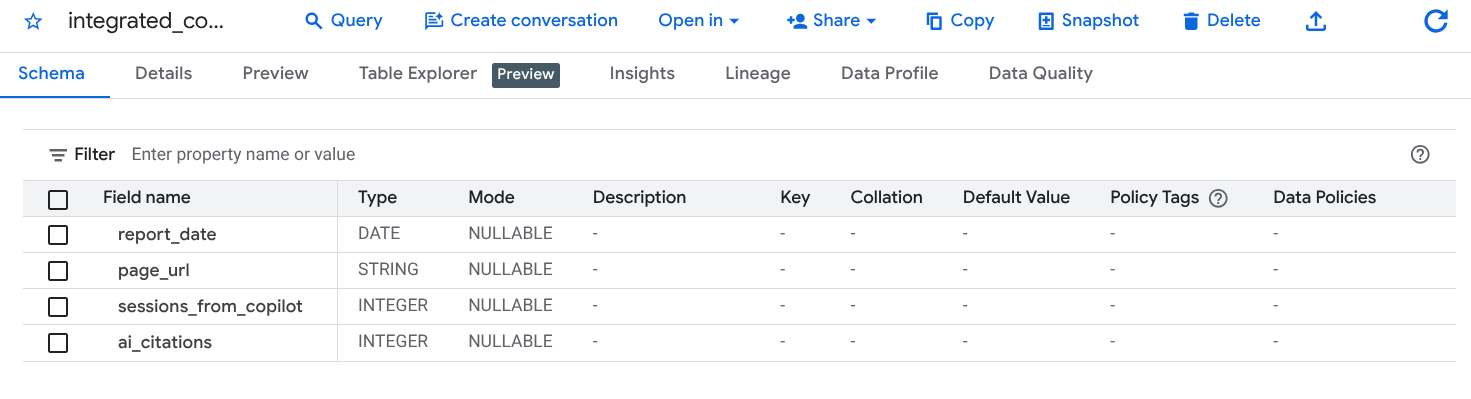
After the query runs without errors, go look at the table and make sure everything is fine.
Using the data in Looker Studio
Add your final BigQuery table as a new data source in Looker Studio. You can now create a dashboard that shows “impressions” (citations) and entrances for your site and for particular URLs, as well as calculate CTR.